A useful service post tells customers what you provide, where you work and what to do next. Start with approved facts; a post does not need a discount or a performance claim to be clear.
Start with four confirmed details
Write down your business label, the exact service offered, the areas you serve and the next action. For example, general servicing for wall-mounted aircon units in Tampines and Bedok is more specific than “best aircon services”. Keep repairs, chemical washes and installation separate unless you actually provide and approve those services.
Use a price only when its scope and conditions are confirmed. A “from” price should explain what changes the amount. If you cannot state a clear price, invite a quotation request and ask for the unit count and service needed.
Template 1: introduce your service
Template 2: explain the next step
Template 3: a shorter caption
Adapt the same facts to each channel
For a longer Facebook post, add a short explanation of the enquiry process. For Instagram, keep the first line specific and pair it with an image you are authorised to use. Do not show a customer's address, face or home details without appropriate permission. Hashtags should describe the actual service and areas, rather than introduce repairs or locations you do not cover.
A review checklist before publishing
- Replace every placeholder and check place names, including translated names.
- Confirm services, prices and availability against your current business information.
- Remove claims about qualifications, savings or results that you cannot support.
- Make sure the contact route works and someone can respond.
- Publish through your own account after reviewing the final text.
Use the free service-post builder to arrange these facts into a template without an account. Members can use the AI social post writer for different wording in English or Simplified Chinese. Both still need your review.
WORKED EXAMPLES · UPDATED 16 OCTOBER 2026
Turn a generic post into a useful enquiry
Consider a fictional owner who offers routine servicing for wall-mounted units in Tampines and Bedok. The owner has not approved a promotion price or confirmed next week's appointments. That is enough information to prepare a useful post; it is not enough to advertise a discount or an immediate booking.
Before: too many unsupported promises
“Best aircon experts. Cheapest prices islandwide. Book today, guaranteed slot!”
This creates four questions the business has not answered: how “best” is established, which price is being compared, whether it covers all areas and whether a slot is actually available.
After: the next action is clear
“General servicing for wall-mounted aircon units in Tampines and Bedok. Message Sample Aircon with your unit count and service area to request a quotation. Scope, price and availability are confirmed before booking.”
The revised post tells the reader what information to send. It makes no claim about a technician's qualifications or the suitability of a particular treatment.
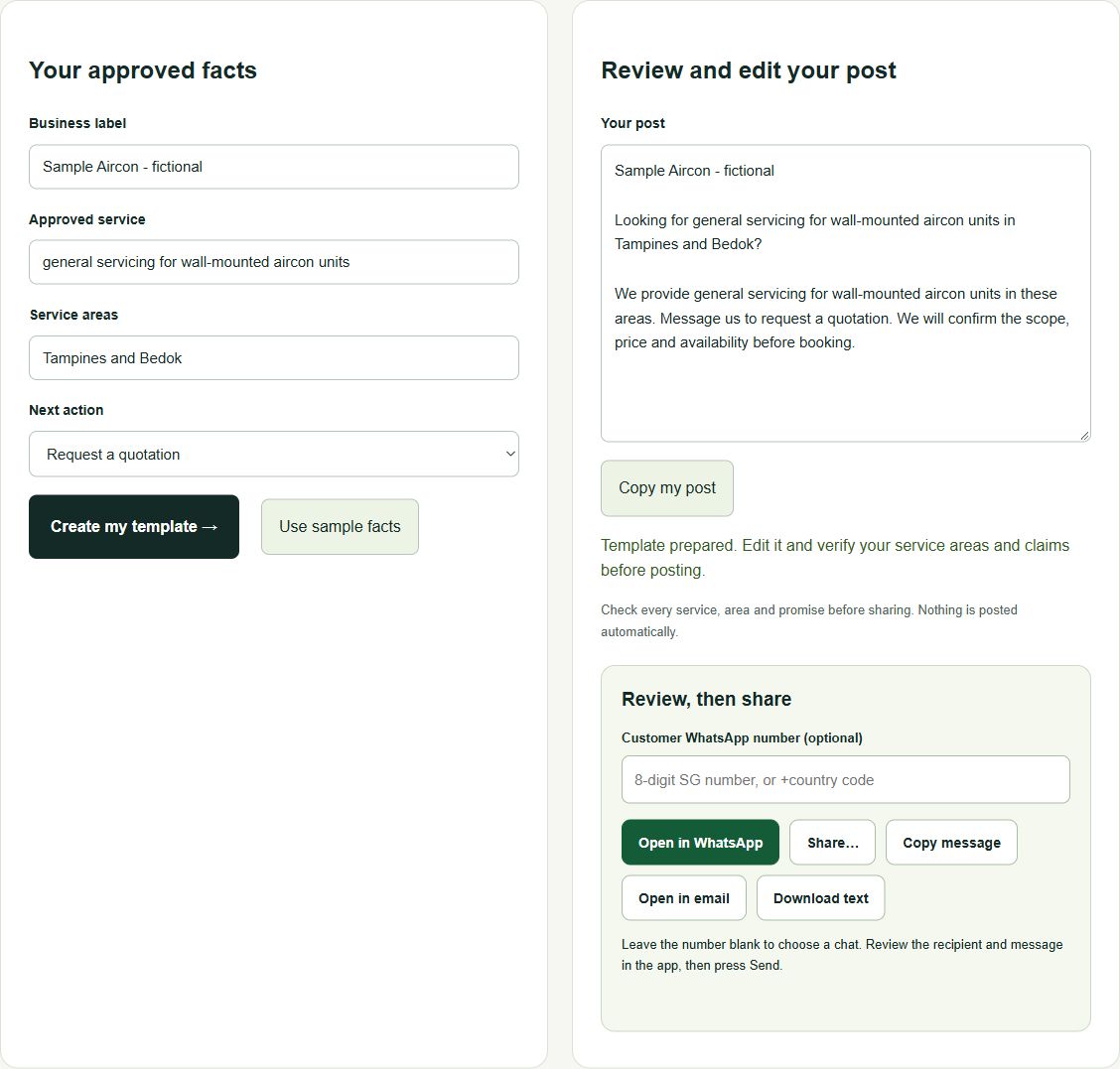
Reproduce this example in the free tool
- Open the free service-post builder.
- Enter your actual business label, approved service and areas. For a practice run, use “Sample Aircon - fictional”.
- Choose “Request a quotation”, then create the template.
- Read the result and remove any fact that is not correct for your business. Add your own verified contact route when publishing through your channel.
Two captions for different situations
Use this when the service and areas are confirmed but no promotional price is approved. For an existing customer, skip the public sales caption and answer the specific enquiry instead.
This process post is useful when many enquiries arrive without enough information. It does not identify a fault or recommend a technical service from symptoms.
Choose the image before pressing Publish
Use an image you created or have permission to use. A photo of a tool or a clearly marked sample quotation can explain the post without displaying a customer's home. Check mirrors, labels, house numbers and screens for identifying details. Do not label a stock or AI image as a completed customer job.
Keep a simple record of the post date, channel and next action. Count enquiries separately from confirmed jobs. A fictional result of three enquiries and one quotation is a way to practise tracking, not evidence that this caption will produce those results.
Keep a desk copy
Download the aircon communications playbook (PDF, 3 pages). Includes missing-detail replies, a quotation calculation, a weekly plan and a feedback action log. Fictional examples for you to adapt; not an automatic sending service.